What the pre-market session is, and who actually trades it
The pre-market session is the stretch of trading between 4:00 AM and 9:30 AM ET, before the regular session opens (Nasdaq’s trading hours). Far fewer participants are present, and brokers may accept only limit orders in it (FINRA on extended-hours trading).
In Scanz, every filter and column that reads the pre-market carries a PM badge (Volume PM, Percent Change PM), so you can always tell a before-the-bell number from a regular-hours one.
Who is trading in it matters more than the mechanics. Before about 7:00 AM the volume is overnight news being priced by a small number of participants, much of it from outside the US. In the mornings we capture, most company press releases land between roughly 6:30 and 8:00, and the earnings calls of companies that reported before the open run through 8:00 to 9:00. Those are habits, not rules; the 8:30 releases are the only fixed time in the session. And from about 9:00 the book starts to fill with the participants who will be there at the bell. One consequence worth stating plainly: the thinner the hour, the more a given price move tells you about the order book and the less it tells you about demand.
This page is about the session and the scan, and ends with the trade plan you write before 9:30: the order, the trigger, the stop, the target and the size. The setup itself — why a gap continues or fails, and how to read the first half hour — is the gap and go setup.
The scan that finds pre-market movers
The scan · Data Scanner · Pre-market, 4:00 AM to 9:30 AM ET
Pre-Market Gappers
| Rule | Setting | Why it's there |
|---|---|---|
| Percent Change PM | ≥ +3% against the previous close | Low enough that the list is not empty at 6:00 AM, high enough to exclude a stock that moved on one print. It is a starting point, not a conviction level — see what to tighten, below. |
| Volume PM | ≥ 100,000 shares | The rule that does the work. A 40% gap on 3,000 shares is one limit order against an empty book; the share count is the closest thing a scan has to asking whether a real book exists. |
| Trades PM | ≥ 200 | Separates 100,000 shares traded by many participants from 100,000 shares in two blocks. Share count alone can be one institution; the trade count says whether anyone else is there. |
7-day free trial. Both Starter and Pro run it; Starter saves one Data scan, Pro saves any number.
Three rules, and all three read the pre-market session. That is rarer than it sounds: of the twenty-odd ready-made Data Scanner templates in Discover, this is the only one whose every rule is pre-market.
The other Gaps scans are not pre-market scans, whatever the card suggests. Gap & Go, Gap Fade and True Gap 5%+ each depend on regular-hours rules — the regular-session open, or regular-hours volume — and none of those exist before 9:30, so the scans cannot return anything until the bell. Two of the three carry a card label reading “Pre-market”, which is the catalog’s advice about when a gap trader cares about the setup, not a statement about what the rules read. If you build a morning routine on one of them you will spend the session looking at an empty list. Roll the survivors of Pre-Market Gappers into Gap & Go after the open, which is what the card’s own playbook says.
Why a share floor and not a relative volume floor
The obvious filter for “unusual activity” is relative volume, and the scan deliberately does not use it. Relative volume in Scanz compares against an average over a period you choose, and it is not matched to the time of day (filter reference): at 5:00 a name’s pre-market volume so far is set against a whole average session, not against what it usually trades by 5:00.
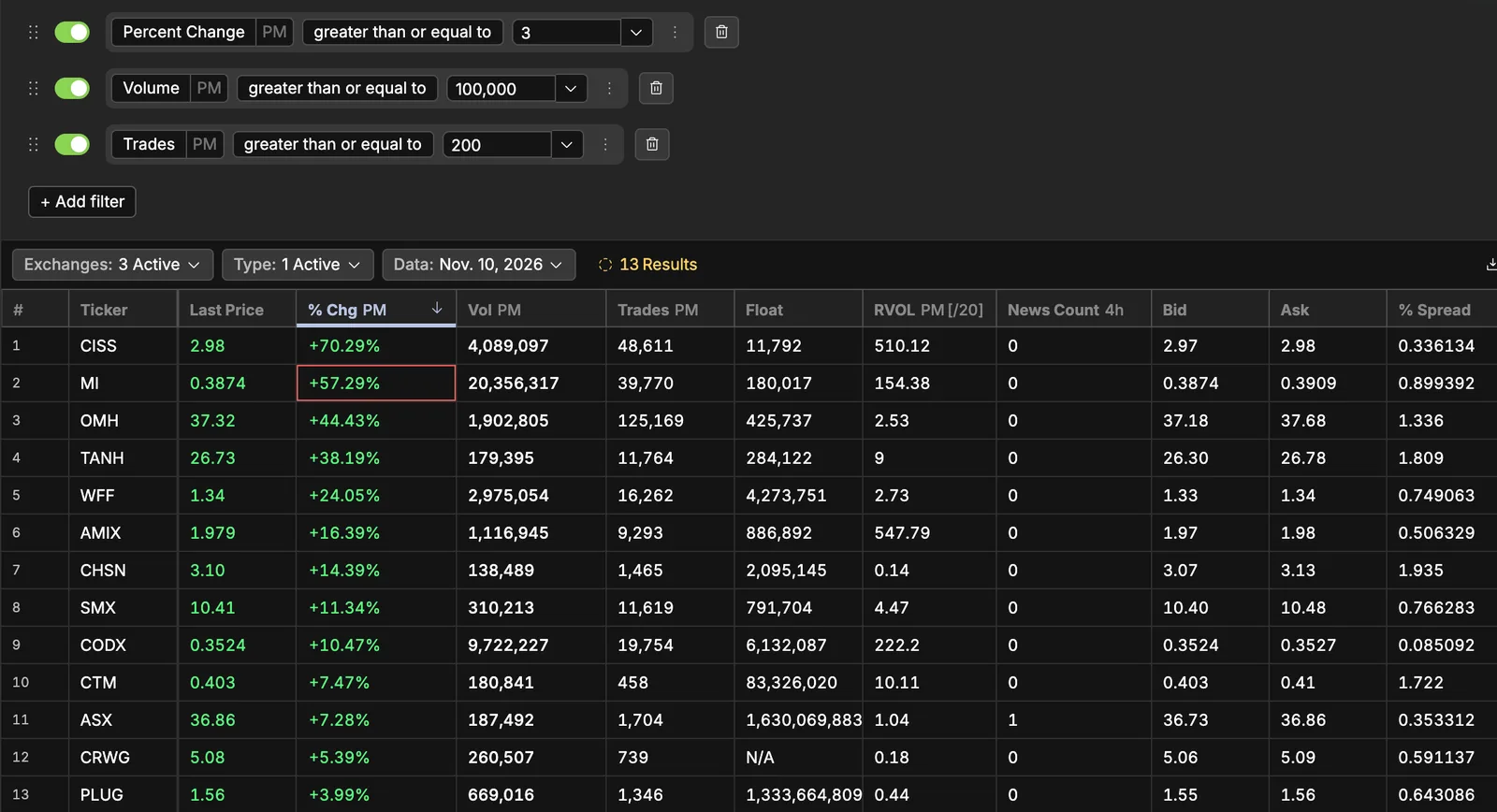
In practice that makes the reading enormous for anything thinly traded and arbitrary as a threshold. On November 10 the RVOL PM [/20] column on this scan’s list read from 0.14 (CHSN, on the list with 138,489 pre-market shares) to 547.79 (AMIX) at 5:00, and PXLW read 100,997 at 9:25. A relative volume floor of 2 would have dropped CHSN, CRWG, PLUG and ASX at 5:00 for reasons that say more about their usual pre-market volume than about that morning. An absolute share count is easier to reason about: 100,000 shares is 100,000 shares at any hour, and the clock is applied by you.
Which brings the one thing the scan cannot do for you.
The share count has to be read against the clock
A single floor is applied at every hour of the session, and the same number does not mean the same thing at both ends of it. By 9:15, with the book filling, 100,000 pre-market shares is unremarkable — a liquid name will clear it without anything having happened. At 5:30 AM, 100,000 shares is a genuinely unusual event and usually means a real catalyst.
So the floor is a floor, and the clock is yours to apply. On a first pass, be suspicious of a name that only just clears 100,000 late in the session, and pay attention to one that cleared it early. We have not measured how pre-market share counts distribute across the session, so treat that as a way of reading the column rather than as a published threshold.
What to tighten, and what not to
The 3% gap is the setting most worth changing, and the direction depends on what you are doing. Raising it to 10% cuts the list to the names that are genuinely in play and is the right move if you are looking for one or two trades; our gap and go page works from a tighter screen for exactly that reason. Leaving it at 3% is the right move if you are building context — which sectors are bid, whether the move is broad or two names.
Three settings worth adding rather than changing, all of them filters that exist today:
- Last Price, with a floor. A floor is not about volatility; it is about the spread as a fraction of the price. Two cents wide on a $40 stock is nothing; two cents wide on a $1.20 stock is most of a scalp.
- Spread or % Spread. Both are filters in Scanz, and the pre-market session is the one time of day when screening on them changes which names you look at. Note that neither takes a session — they read the current quote, which pre-market is the pre-market quote.
- Float, if you trade small caps. Worth knowing the honest version: a low float raises the ceiling on the move and the chance of a halt at the same time, and Scanz cannot scan for halts at all.
Filters combine with AND only — there is no OR between them — so a condition like “either a big gap or heavy volume” is two scans, not one.
4:00 to 9:30, hour by hour
The first three hours are not worth the same attention as the last two, but they are worth knowing about, because what a name does at 5:00 changes how its 9:00 price should be read. The blocks below are the usual shape of a session as we see it in the scan, not a timetable; only 8:30 is scheduled.
| Block (ET) | What usually drives the list | How to read it |
|---|---|---|
| 4:00 – 6:30 | Overnight and non-US news already in the market. A handful of names, often with large percentage moves on very few shares. | The thinnest part of the session. A name clearing 100,000 shares here has a real catalyst. Percentage moves are close to meaningless on their own. |
| 6:30 – 8:00 | The main company press-release window, and most before-the-open earnings. The list turns over and grows. | Where most of the day’s genuine candidates first appear. Check each name’s headline rather than its percentage. |
| 8:00 – 8:30 | Earnings calls for companies that reported earlier. Moves extend or reverse as guidance is heard. | A name can give back its entire pre-market gain in this half hour without a new headline. |
| 8:30 | Scheduled US macro releases. See below. | Add nothing on the print. Re-read the whole list once it has traded. |
| 8:30 – 9:15 | Positioning. Volume builds across the whole list rather than in one name. | The list stabilises. Your watchlist should be getting shorter, not longer. |
| 9:15 – 9:30 | The book fills with the participants who will be there at the bell; auction imbalances build. | Levels, not new names. Nothing you add in these fifteen minutes gets the attention it needs. |
The Trades PM column is the most useful one to watch change through those blocks. A name whose trade count climbs steadily through 7:00 and 8:00 is attracting participants; a name whose share count jumps while its trade count does not has had one or two large prints and nothing else.
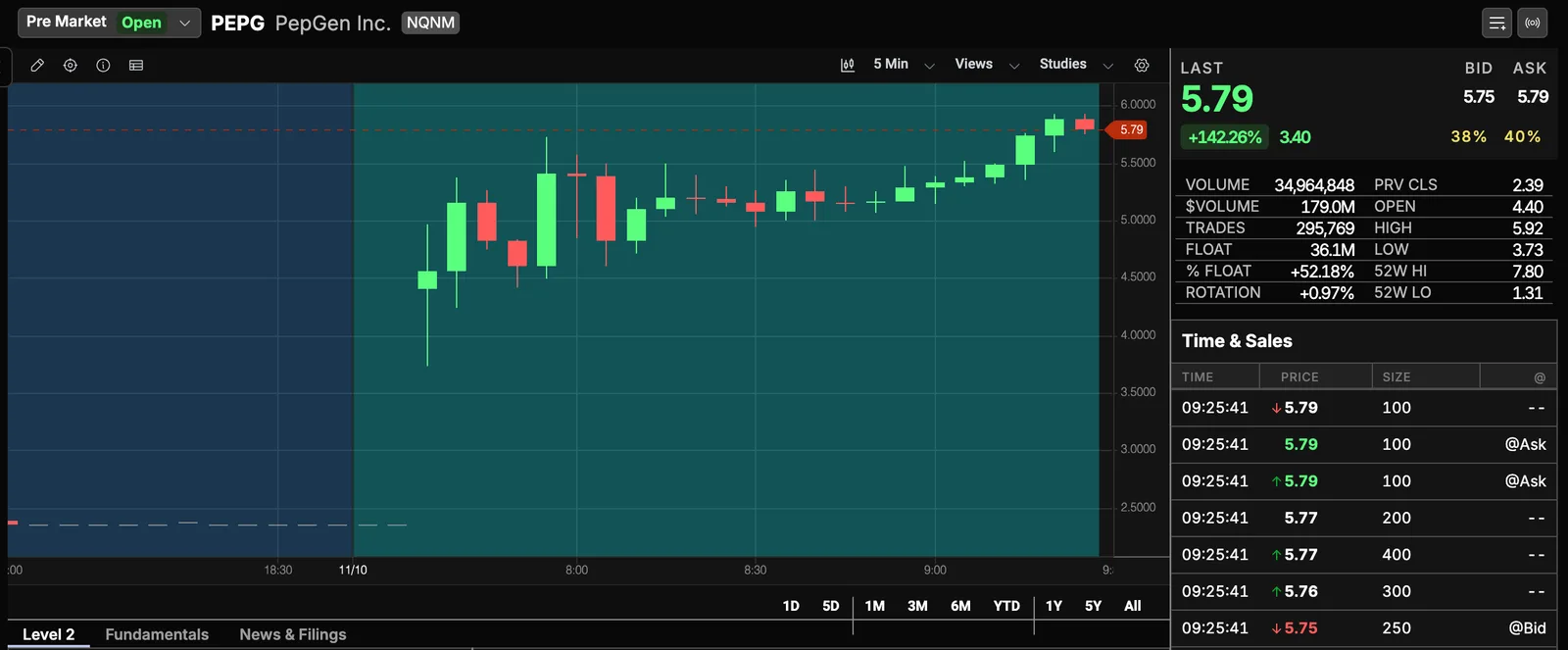
Here is one real morning. On Tuesday, November 10 2026, the template above returned 13 names at 5:00 AM ET, 28 at 7:45, 40 at 9:25 and 38 at 9:37. The 5:00 leader was CISS, up 70.29% at $2.98 on 4,089,097 pre-market shares. By 9:25 it was twelfth, up 18.23% at $2.07: most of the gain was gone before most published routines begin. PEPG was not on the 5:00 list at all; it was second at 7:45, up 111.72%, and first at 9:25, up 145.62% on 34.9 million shares, with four headlines in the last four hours.
For the headlines behind the names, the News Scanner templates are all usable pre-market — none of them has any session scoping, so all twelve run before the bell. One quirk to know: the news feed’s Data selector offers only today and the previous trading day, and before the pre-market session opens it starts from the previous trading day. There is no custom range and no last-N-hours.
8:30 a.m.: the print that rewrites the list
Scheduled US economic releases land at 8:30 AM ET: the consumer price index and the jobs report from the Bureau of Labor Statistics (release schedule), and GDP and personal income from the Bureau of Economic Analysis (release schedule). Not every morning has one, so check the two calendars before you start. On a morning that does, it is the one scheduled event inside the session that moves every name on the list at once, and it lands shortly before most traders finalise a watchlist.
On a release morning, index products move first and every name on the list is repriced against that move, so the percentage ordering can reshuffle without a single new headline. Treat 8:30 as a boundary: build the list before it, add nothing on the print itself, and once it has traded ask of each name whether it is still moving on its own catalyst or just with the market. A name that holds its gain through a broad move down is telling you something the % Chg PM column cannot. Scanz has no economic calendar, so keep the schedule elsewhere.
9:30: what happens to your scan at the bell
The bell is where most pre-market writing stops, and it is where the most confusing few minutes of the morning begin.
The opening print can be a long way from the last pre-market trade. The regular session does not begin by continuing the pre-market tape; it begins with an opening auction that matches accumulated buy and sell interest at a single price (Nasdaq’s opening cross). If that interest is unbalanced, the opening price can be well away from where the stock was quoted at 9:29. This is the usual answer to “why did it open fifty cents below the pre-market high” and it is not a data error.
Your pre-market columns stop describing the present. Volume PM and Percent Change PM are session-scoped, so after 9:30 they hold the finished pre-market figures and stop moving. That is useful — the pre-market volume a name finished with is worth keeping on screen — but it is not what is happening now. A scan intended to work after the open needs regular-hours or full-day rules, which is why Gap & Go is a separate scan rather than the same one later.
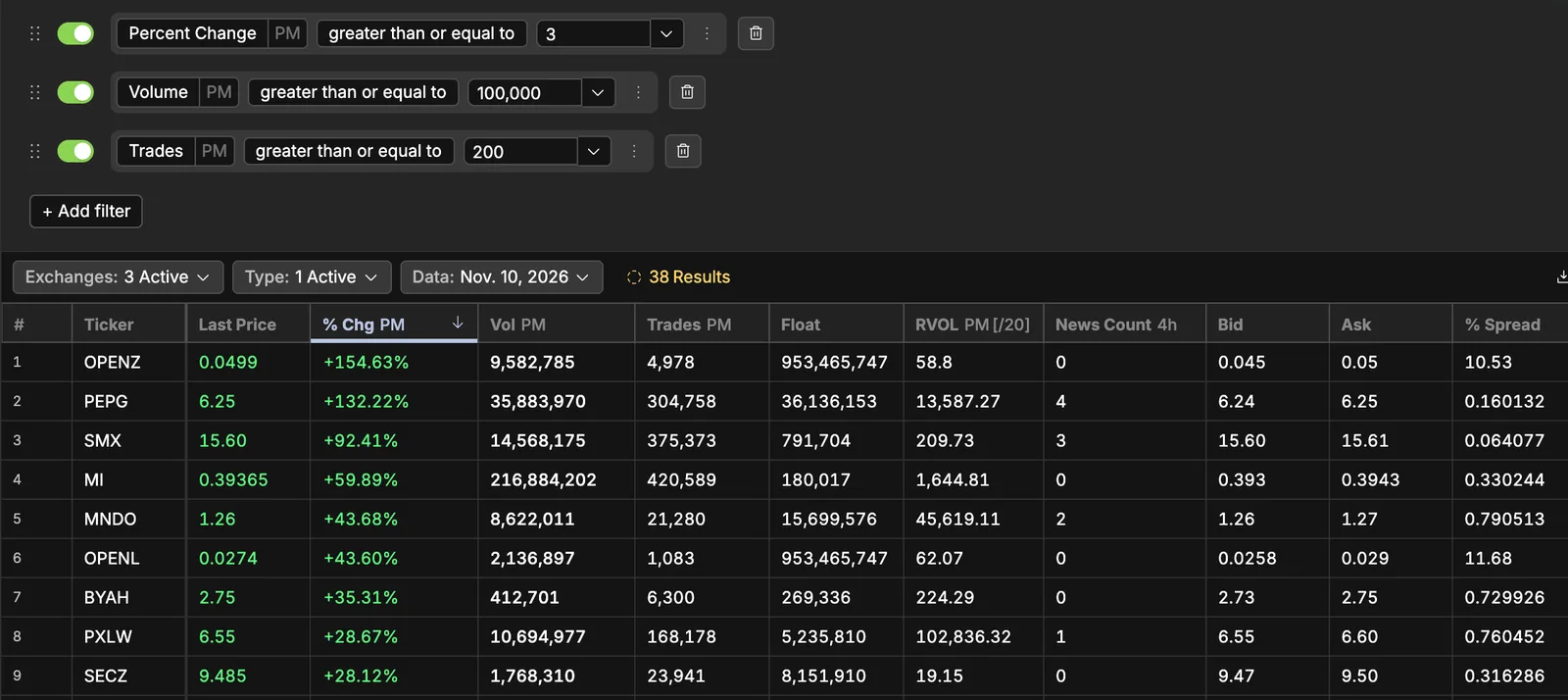
On November 10 the difference was easy to see. At 9:37, PEPG’s row read +132.22% in % Chg PM beside a last price of $6.25. Against the previous close of $2.39, $6.25 is up 161%; +132.22% is about $5.55, where the pre-market finished. The list is still ranked by how the pre-market ended, not by what is trading now.
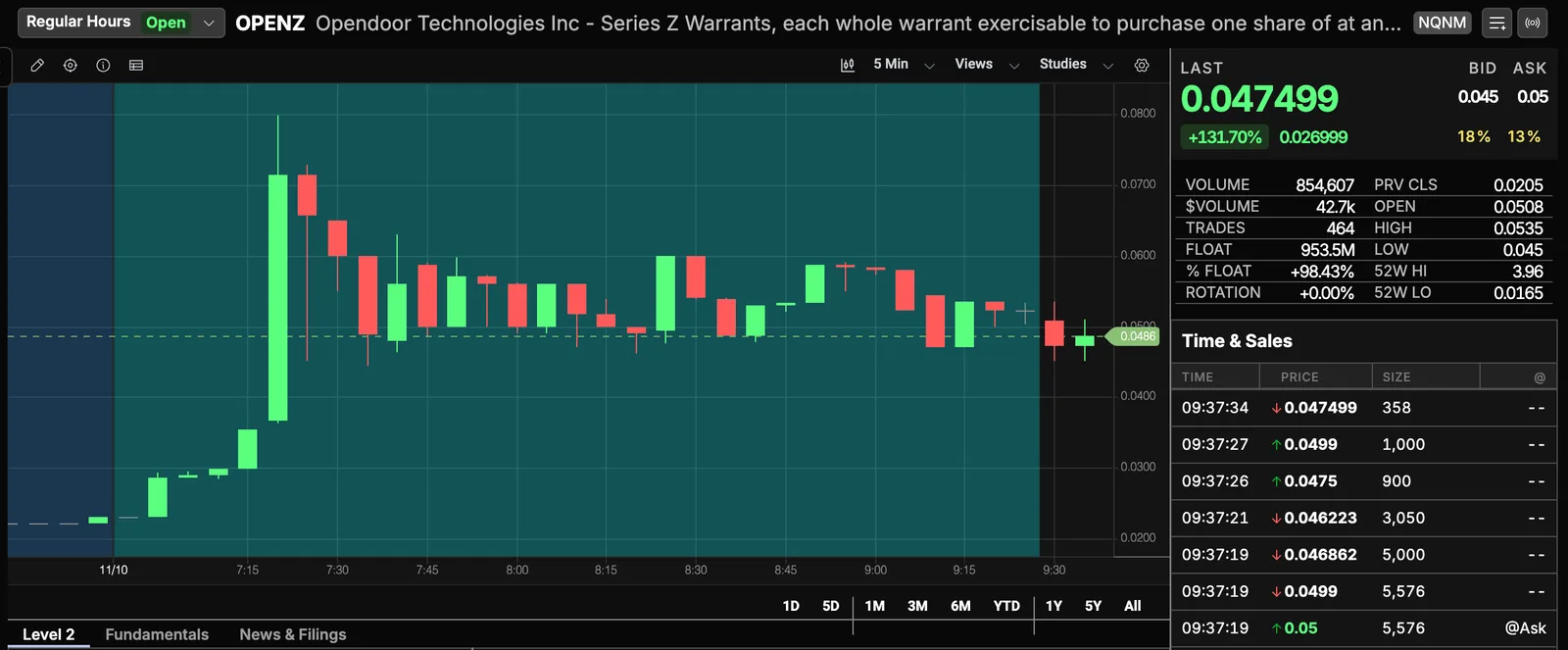
The quote panel, by contrast, switches with the session. At 9:37 the OPENZ montage reads Regular Hours and a volume of 854,607 — regular-session shares only — while the scan’s Vol PM column still shows the 9,582,785 it traded before the bell.
The list reshuffles hard in the first minutes. Expect the ordering to be unstable until the auction prints have settled.
What the November 10 list did next. PEPG, the one name that passes all five skip rules below, opened at $5.545: about where its pre-market column froze, and 37 cents under its $5.92 pre-market high. In the first five minutes it traded down to $5.15 and back over the pre-market high, then reached $6.49 by about 9:45, and was $5.78 at 10:05, back under the pre-market high, on 26.3 million regular-hours shares. CISS, the 5:00 leader that the skip rules drop, opened at $2.07, reached $2.37 and was $1.97 at 10:05, never near the $2.98 it printed at 5:00.
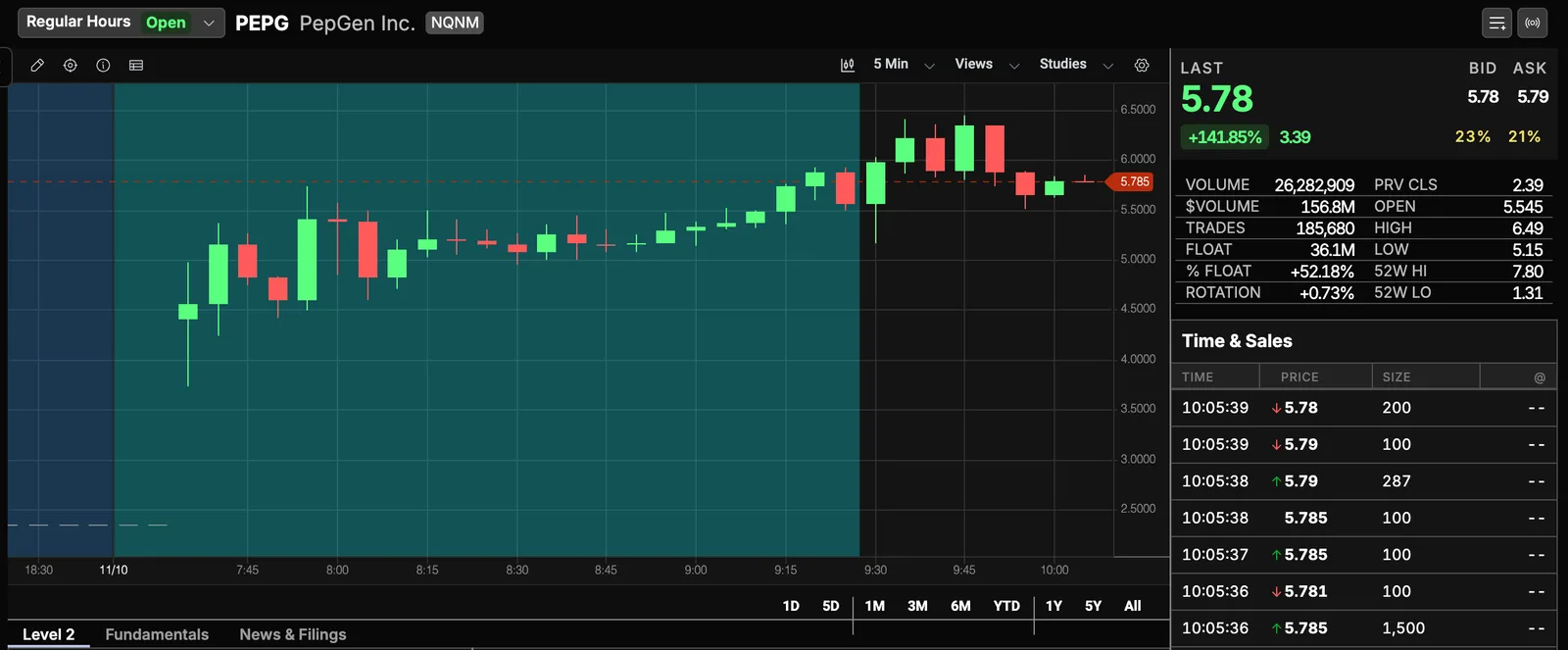
One morning is not a verdict on anything. What it shows is the handover itself: the first price was not the last pre-market high, the first five minutes ran against the gap before running with it, and the pre-market high was a level price crossed twice in thirty-five minutes. That is why it is drawn before the bell.
The levels worth having drawn before any of this are the pre-market high and low, the previous day’s close, and the previous day’s high and low. What to do when price reaches them is the gap and go setup for a continuation and the opening range breakout for the first range of the regular session.
What pre-market risk actually costs, in numbers
Every page on this subject says spreads are wider. Almost none of them say what that means for a trade, so here is the arithmetic rather than the adjective.
A spread is a cost you pay on entry and again on exit. If a $4 stock is quoted two cents wide, a twenty-cent target is a trade with a 10% toll. If the same stock is quoted seventeen cents wide at 6:00 AM, the same twenty-cent target is gone before the stock moves. That is the whole argument for a price floor and for screening on % Spread in this session specifically, and it is also why a tight stop and a pre-market entry are usually in conflict: the stop is often inside the spread.
The same list can hold both ends of that. At 9:25 on November 10, PEPG — 34.9 million pre-market shares — was quoted $5.75 bid, $5.79 ask: four cents on a $5.79 stock, 0.7%. At 9:37 OPENZ, first on the same list, was quoted $0.045 bid, $0.05 ask, a 10.53% spread.
Five more, stated honestly:
- The top of the list may not be a share. OPENZ, first on the list at 7:45 and again at 9:37, is a Series Z warrant on Opendoor, priced around five cents, and its Float column reads 953,465,747. A percentage scan does not tell a warrant from a stock; read the name before the number.
- Your broker may accept only limit orders before the bell (FINRA), and routing differs by venue and session. The price a scan shows you is a print that happened, not a price you are being offered.
- Halts happen pre-market, and Scanz cannot scan for them. There is no halt filter, no halt scanner and no halt signal. A halted gapper sits on your list looking normal. This matters most on exactly the low-float names a pre-market scan surfaces.
- The short side has constraints a scan cannot see. Borrow availability and hard-to-borrow status are not available as filters or columns. Short interest, short ratio and days-to-cover are, but they are not the same question as whether you can get a locate this morning.
- You cannot test a pre-market idea on history here. The scan’s Data For selector offers today and the previous trading day, and nothing else. Whatever you conclude about the session, you will be concluding it forward, one morning at a time.
When to drop a name: five skip rules, tested on November 10
The scan’s job is to put names in front of you. Most of them should come off again before 9:25, and it is quicker to strike a name on a rule than to argue with yourself about it. Five rules, each with a number and a reason, then what they did to the November 10 list.
| Skip it if | Why |
|---|---|
| The spread is more than 1% of the price | You pay the spread on the way in and again on the way out. Past 1% each way, a modest target is mostly toll. |
| It is not a common share | A warrant, a right or a unit moves on different terms, often at a fraction of a cent. A percentage scan lists them beside the stock. |
| It has given back more than half its gap by 9:25 | The move already failed once, in front of everyone who was watching. |
| You cannot find the headline | News Count 4h reads the last four hours only, so a zero at 9:25 sends you to the News Scanner, not straight to a decision. No catalyst at all means the move is all flow. |
| It is barely over the volume floor at 9:25 | 100,000 shares after five and a half hours is a quiet stock, not a pre-market mover. |
Run against the November 10 captures above:
- CISS led at 5:00, up 70.29%. By 9:25 it was up 18.23%, having given back about three quarters of the gap, and its
News Count 4hread zero at both times. Dropped on the third rule before the others are needed. - OPENZ is a warrant, so the second rule drops it. The spread rule shows why that is a rule and not a matter of taste: at 9:25 OPENZ was quoted 0.4% wide and would have passed; at 9:37 it was 10.53% wide.
- KLTR, SENS and ZNTL were on the 9:25 list with 125,677, 128,526 and 150,434 pre-market shares — within about 50,000 shares of the floor after five and a half hours. The last rule drops all three.
- PEPG passes all five. A common share, 0.7% wide at 9:25, four headlines in four hours, 34.9 million pre-market shares, and up 145.62% at 9:25 against 111.72% at 7:45: it added to its gap rather than giving it back.
Five rules at a few seconds a name is how a 40-name list becomes the three to five the checklist below assumes.
Write the trade before 9:30: one plan, on PEPG’s November 10 levels
Every number in a trade plan for the open is known by 9:25: the pre-market high, the spread, the price that says you were wrong, your dollar risk. Writing them down before the bell is the point, because in the first two minutes there is no time to work them out. Here is the plan for the one name the skip rules left on November 10, built from the 9:25 capture and checked against what the stock did. It is a worked example of the arithmetic, not a recommendation to trade PEPG or any stock.
| Line of the plan | The rule | PEPG, November 10 |
|---|---|---|
| Order type | Limit orders only. Before the bell your broker may accept nothing else; in the first minutes after it, a limit caps what you pay when the first prints are far from the last quote. | Buy limit a cent or two over the trigger, never a market order. |
| Trigger | A trade above the pre-market high after 9:30, on volume — the gap and go entry. No trigger, no trade. | Pre-market high $5.92, so entry about $5.93. |
| Stop | The price that says the break failed, and several spreads away from the entry. A stop inside the spread is a stop you pay to have hit. | Under the $5.545 open: about $5.54. Risk $0.39 a share. The 9:25 spread was $0.04, a tenth of that. |
| First target | A multiple of the risk, set before the entry: 1R is one risk unit above the entry, 2R two. | 1R $6.32, 2R $6.71. |
| Size | Dollar risk divided by risk per share, rounded down. | $100 ÷ $0.39 = 256 shares, so 250. |
| Skip | It never trades above the trigger, or it opens and slides back toward its pre-market lows. | CISS never came near its $2.98 5:00 print: no trigger, no trade. |
What happened, read off the five-minute chart above. The first bar after 9:30 holds both the $5.15 low and the first trades over $5.92, and it closed near its high, so the dip most likely came before the trigger; a five-minute bar cannot prove the order. Price ran to $6.49 by about 9:45: the 1R target at $6.32 filled, the 2R target at $6.71 did not. The 9:55 bar’s low is drawn at about $5.51, through the $5.54 stop. A trader who sold half at 1R and was stopped on the rest finished about flat; one who held all 250 shares without a target lost the $97 the plan allowed, on a stock that had been 56 cents in their favour. That is the case for writing the target down before the open.
Two things the arithmetic shows. The spread rule and the stop are one rule: on PEPG a four-cent spread was a tenth of a 39-cent stop, while on OPENZ at 9:37 the spread alone was more than 10% of the price, so any stop sensible for the trade sat inside it. And the size line is what keeps a wide stop survivable: the share count falls as the stop widens, so the dollar loss stays the one you wrote down. If you want the trigger to come to you, a New High signal in the Signal Scanner with the session set to Full Day fires on the first new high after 9:30, which before the bell is the pre-market high; signals and alerts are covered on the gap and go page.
Before the bell: the 9:25 checklist
By 9:25, this is what should be true
- The list is three to five names, not twenty. You cannot read more order books than that in the first two minutes.
- Each name has a headline you have actually read, or you know that it does not have one.
- Each name is well clear of the volume floor: several hundred thousand shares or more, not 125,000 at 9:25.
- For each name, the pre-market high and low are drawn, and so are the previous day's close, high and low.
- You have re-read the list since the 8:30 print, and dropped anything that is only moving with the market.
- You know each name's spread as a fraction of its price, and you have dropped the ones where your intended stop sits inside it.
- Your plan for the open is written before the open, including the price that says you were wrong.
The session on one card
- Session
- Pre-market, 4:00 AM to 9:30 AM ET. Columns and filters carry the PM badge.
- The scan
- Pre-Market Gappers: Percent Change PM ≥ 3% vs previous close, Volume PM ≥ 100,000, Trades PM ≥ 200.
- How the list fills
- November 10: 13 names at 5:00, 28 at 7:45, 40 at 9:25. Build it all morning, re-read it after 8:30, add nothing after 9:15.
- The cut
- Three to five names by 9:25. Drop wide spreads (over 1%), non-common shares, half-faded gaps, no headline, and names barely over 100,000 shares.
- Hard boundary
- 8:30 ET macro releases. Build the list before, re-read it after.
- The trade
- Written by 9:25: limit entry over the pre-market high, stop several spreads away, 1R and 2R targets, size = dollar risk ÷ risk per share.
- At the bell
- The opening auction sets the first price, PM columns stop moving, the order reshuffles. Switch to a regular-hours scan.
- What the scan cannot see
- Halts, borrow availability, and anything before yesterday.
Questions traders ask
What time does pre-market trading start?
4:00 AM ET, and it runs to 9:30 AM ET when the regular session opens. That is the window Scanz means by the PM session badge on a filter or a column. The first two and a half hours are thin: on November 10 the template listed 13 names at 5:00 and 40 by 9:25.
Can you scan for pre-market movers on any plan?
Yes. There is no plan gate on Discover, on templates, or on any session — Starter and Pro both run pre-market scans on real-time data. The difference is how much you keep and how much you run at once: Starter saves one Data scan and runs one scan at a time, Pro saves any number and runs them together. Alerts are Pro only, which matters if you want a sound when a new name hits the list.
Why does my pre-market scan show nothing at 7:00 AM?
Usually a rule is reading the wrong session. Every session-scoped filter carries a badge — `PM` pre-market, `RH` regular hours, `AH` after hours, `FD` all sessions combined — and a regular-hours volume or percent-change rule cannot be satisfied before 9:30. Scanz puts a clock icon beside a filter whose session is not live and names both sessions in its tooltip, and a results table for a session that has not started is replaced by an explanation rather than an empty grid. The other cause is thresholds tuned for the regular session. The three other Gaps templates all have regular-hours rules and genuinely return nothing pre-market.
Why do names keep appearing and disappearing from my pre-market scan?
Because they sit on a threshold. A name at 101,000 pre-market shares against a 100,000 floor, or +3.05% against a 3% floor, leaves the list when a print moves it the other side of the line and returns on the next one. That flicker is a thin book showing itself. To stop it, move the floor away from where names sit — at 250,000 shares a name bouncing around 100,000 is simply not listed. Two things that are not flicker: a rolling look-back window that moved past the event, and a symbol you hid (right-click, Hide for today or Always hide symbol), which stays hidden until you unhide it; the filter row shows how many are hidden.
Why does my scanner show a bigger percentage move than my broker?
Because the two are usually not measuring the same thing. A pre-market percentage change has to be measured against something, and the baseline matters: Scanz compares against the previous close by default and lets you change the comparison. Thin sessions also mean a single print can set the last price your scanner reads. When the numbers disagree, check the baseline before assuming one of them is wrong.
How many stocks should be on a pre-market watchlist?
Three to five by the bell: in the first two minutes of the regular session you can only follow a few order books. On November 10 Pre-Market Gappers listed 40 names at 9:25; the five skip rules above cut that to a handful.
Is relative volume useful pre-market?
As a column, yes; as a filter, rarely. It is not matched to the time of day: on November 10 the list read from 0.14 to 547.79 at 5:00. A share-count floor is easier to reason about, which is why the template uses one.
Can Scanz alert me when a stock is halted pre-market?
No. There is no halt filter, scanner or signal, so a halted gapper stays on the list looking like any other name.
Can I get an alert on new pre-market highs?
Yes, but you build it rather than copy it. The New High signal takes a session, so you can set it to Pre-Market in the Signal Scanner. The ready-made New Highs template in Discover is the full-day variant, so copying that one and expecting pre-market behaviour will not work. Alerts themselves are a Pro feature.